Hack Websites Using HexJector

Hexjector is an Opensource,Multi- Platform PHP script to automate site Pentest for SQL Injection Vulnerabilties.

Trick To Use Multiple Email ID’s From Single Gmail Account

You hack and ID in the e-mail can be made, so you might be a bug in the phone or ID gmail.If moves to a single Gmail ID can use it many times in a single to create a separate email account required to register, I abc.com I have two accounts for a separate account to e-mail id that I must use. Suppose this approach a single account for any e-mail using the site will be able to register more than once.

Free Developer Preview of Windows8

After a long waiting of windows lovers Microsoft has released pre-beta version of new windows OS called windows 8 ,windows 8 developer preview version is now available for download at Microsoft’ site for free.Both 32 bit and 64 bit version of the windows 8 iso files can be downloaded from microsoft website.

Find product key of windows 7 inside the CD-disk

If you forgot the Product KEY of win7 then this artical will be very usefull for you...

20 Great Google Secrets

But most people don't use it to its best advantage. Do you just plug in a keyword or two and hope for the best? That may be the quickest way to search, but with more than 3 billion pages in Google's index, it's still a struggle to pare results to a manageable number...

Showing posts with label Technology. Show all posts

Sunday, October 2, 2011

Download Latest Version Of Windows 8 From Microsoft Website For Free:


After a long waiting of windows lovers Microsoft has released  pre-beta version of   new windows OS called windows 8 ,windows 8  developer preview version is now available for download at Microsoft’ site for free.Both 32 bit and 64 bit version of the windows 8 iso files can be downloaded from microsoft website. 


Unexpectet: Windows 8 can  run on every computers on which windows 7runs (even almost

                                     netbooks can handle windows 8 )


Minimum System Requirements for Windows 8
§  processor : 1 GHz or faster  32-bit  or 64-bit 
§  RAM:1 GB for 32-bit version and 2 GB for 64-bit version
§  hard disk :16 GB available disk space for 32-bit and 20 GB for 64-bit system
§  Graphics:DirectX 9 graphics device with WDDM 1.0 or higher driver
§  Touch support: supports multi-touch display

WINDOWS 8 ISO IMAGE FILE DOWNLOAD
1) WINDOWS 8 64 BIT  WITH DEVELOPER TOOLS
§  Windows SDK for Metro style apps
§  Microsoft Visual Studio 11 Express for Windows Developer Preview
§  Microsoft Expression Blend 5 Developer Preview
§  28 Metro style apps including the BUILD Conference app

2) Download WINDOWS 8   64 BIT  (WITHOUT DEVELOPER TOOLS)

3)Download WINDOWS 8  32 BIT (WITHOUT DEVELOPER TOOLS)

:-Steps to install windows 8 with Downloaded image
§  Download the iso file
§  Use cd burner applications like nero or burnaware to burn the iso image into dvd
Note: you can’t burn "WINDOWS 8 64 BIT "WITH DEVELOPER TOOLS” in normal dvd disc because it’s too large in size so you need double layer dvd (8GB)
§  insert the dvd and restart your computer
§  setup will automatically start from the dvd ,if not you need to change the boot device priority in your BIOS setup.


Saturday, January 29, 2011

Want to increase Your Airtel broad band Speed To 2MBPs??


Though its not a hack but Airtel is the only service provider in India which is providing 2MBPS on demand, so I would like to share about this.
speed on demand airtel 300x69
Here is the trick to get 2 MBPS on Airtel broadband
#All you need is a Airtel Broadband connection.
Airtel no : User name
Account no: password
Now all you have to do   is
#Go to your modem/router
By typing
192.168.1.1
# Default user and pass= admin & password# Now there in the left bar click on WAN and then click on edit
beetal router settings screenshot 300x210
# Click on next until you get the following screen
Now in the username and password field enter the following:
3userpass www 84productions blogspot com
# PPP Username : 123xxxxxxxx_dsl@airtelbroadband.in
(Enter your username and password)
Now in the password field type the account no. or new password if you have changed.
Then save the settings and reboot.
Now how to get 2 MBPS speed??
I’m sure many of you are aware of speed on demand from Airtel.
Go to this page: CLICK HERE
Bandwidth+on+demand
And now enter your and password that you have entered in the router.
and click on 2MBPS and activate it.
Bingo! now you are using 2 MBPS Airtel connection!! icon smile
Do remember you will be charged as 120/hr.
Updated news is Tata launched the 100 MBPS internet connection in mumbai @ 10,500/month.
For Further Reading:

Friday, January 28, 2011

Electronic SPY Camera Shirt:


It's what 007 wears on laundry day:
  • T-shirt with a built-in spy camera
  • Classic spy style artwork on a blue shirt
  • Click the control box in your pocket to take picture.


It's what 007 wears on laundry day.
Spy ShirtEven Mr. Bond has to have an off day when all his fancy duds are at the $1.50 Dry Cleaners and he's down to his last pair of underpants. But just because his suit jackets are gone doesn't mean he can't hide fancy spy gadgets on his person. Before he drags out the t-shirts he wore while canvassing for decade-old political campaigns or his favorite band that broke up when he was in college, he goes for his old standby, the From Tokyo With Love Electronic Spy Camera Shirt.
Spy T Shirt


It's so deliciously obvious. Centered in the artwork on the shirt is the man himself, holding a camera to his face. But not just a picture of a camera. Hidden behind the soft cotton exterior is a fully-functioning spy camera. That's right. Whatever your chest can see, the camera can see. A cable connects the camera to a small black box that fits discreetly in your pocket. Just reach in, press the button, and your shirt will capture the evidence before you.
Feedback Remote
Important Note
The Electronic Spy Camera Shirt is for novelty purposes only. Please respect the privacy of other carbon based life forms... robots and aliens are fair game. Best results are achieved by shooting during the day. Night shots are only feasible if you can stand amazingly still and your subjects are not moving.


Example Shots
Example Stealthy Pix Shot with Spy Camera Shirt


Product Features
  • Stylish retro spy theme T-Shirt has a tiny color digital camera hidden in the chest
  • Use the pocket based remote to shoot color digital photos
  • Vibration feedback shutter lets you know when you've taken a new shot
  • Holds over 150 color digital photos, 640 x 480 resolution
  • Electronics are completely removable for washing
  • Plug in with USB to download photos
  • Works with any OS including Mac, Linux and Windows
  • Requires 3x AAA batteries (not included)
  • Price : $39.99
You might also like:

Directly executable .txt?Yes!


I’m sure you know the good old trick with hidden extension, or multiple extensions, long file names, etc.. Today, we’re going to look at much more sophisticated way of confusing users. Did you think, that when you’ve got some file and clearly see, that the extension of this file is .txt, the file’s not directly executable? You were wrong.

How is it possible? It’s quite simple – thanks to UNICODE and its special characters. Namely the special character RLO (Start of right-to-left override).

6a00e5539a104188340148c690726c970c-800wi
Just take a file, name it “txt.exe”, insert the RLO character before it and.. the filename changes to “exe.txt”. However, it’s still executable file and the real extension is “.exe”. This could be definitely very confusing for users and also dangerous, so be careful and better scan your files (at least those downloaded from internet) before opening them.


Get more information about it @http://www.fileformat.info/info/unicode/char/202e/index.htm
You might also like:

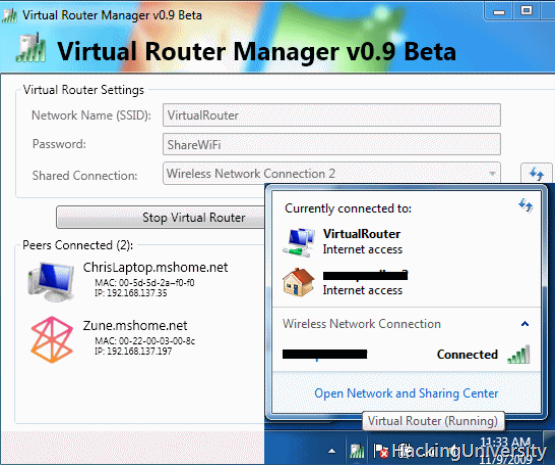
Create Wi-Fi Hotspot,Use Laptop as Wireless Router with Windows 7:


Virtual Router converts any Windows 7 or Windows Server 2008 R2 on a WiFi access point to Windows 7 hosted wireless network (virtual WiFi) technology. Virtual Router router is a free software that works with Windows 7 or Windows Server 2008 R2.
MAKE UR LAPTOP A WIRELESS HOTSPOT FOR USING IT AS A WIRELESS CONNECTION:


Users can wirelessly share any Internet connection (WiFi, LAN, cable modem, dial, cellular, etc) with any Wi-Fi device (laptops, smart phones, iPod Touch, iPhone, Android phone, Zune, netbook, wireless printer, etc.) These devices connect to the virtual router as any other access point and the connection is fully secured with WPA2 (the most secure wireless encryption.)

Create Wi-Fi HotSpot Use Laptop Wireless Router Windows 7
Unlike other similar applications, Virtual Router is not only completely free, but do not bother with any ad. Also, since the Virtual Router is not advertising, does not track your web traffic, the way of other applications with advertising / can.
# Download Virtual Router : LINK
The wireless network or to create shared virtual router uses WPA2 encryption, and no way to disable the encryption. This is actually a feature of the wireless network hosted API built into Windows 7 and Server 2008 R2 to ensure the best possible security.
You can give your "virtual" wireless network in any name you want, and also set the password to anything. Just make sure that the password is at least 8 characters.
You might also like:

Just Anonymous Surfing:


Anonymous surfing allows you to surf the web without leaving a trail of particulars about your browser, your computer system, your country, IP address, etc. This is usually done by entering the address (URL) of the site you wish to go to at the free anonymous surfing proxy site, and that site will retrieve the page for you and present it to you.
The site you visit will not receive any particulars about your system, your IP address etc. because the proxy will not have transmitted such particulars to it. This is a selection of some of the best freeware (free) services for anonymous surfing online:


  • Anonymouse – allows you to surf the web without revealing any personal information. Instead of your computer transmitting the data directly to the recipient (Web-, News- or Email-Servers), these are transmitted to the Anonymouse server. The Anonymouse server anonymizes the transmitted data and continues to transmit these then to the actual recipient. A possible response (Web-Server) of the recipient is transmitted over the Anonymouse server back to you. Works well and can be used without any payment, so useful for free anonymous surfing.
  • Proxify - is a web-based anonymous proxy service which allows anyone to surf the Web privately and securely. Unlike other proxies, there is no software to install or complicated instructions to follow. Just enter a URL (website address) in the form above. Through Proxify, you can use websites but they cannot uniquely identify or track you. Proxify hides your IP address and our encrypted connection prevents monitoring of your network traffic. Once using Proxify, you can surf normally and forget that it is there, protecting you.
  • Megaproxy – is a medium that handles web requests on your behalf in order to preserve the privacy and integrity of your Internet experience. When using Megaproxy your web requests are first sent to Mega proxy which processes and filters them for your security as quickly, and usually quicker, than if they were sent directly to the target web site. On average, the process is completed within ten milliseconds. Because the connection to the Megaproxy service is encrypted with 128bit SSL encryption, neither the target web site nor the Internet Service Provider is able to determine where you are from, from where you are surfing, or what content you are downloading.
  • The Cloak – HTTP and HTTPS anonymous proxy: hide your identity from the sites you visit. Encrypted connection: hide your surfing from local snooping. Remote cookies: keep cookies at our site, and delete them after each session. User configurable content filtration: selectively remove JavaScript, Java, and active content. FREE anonymous browsing. The Cloak sits between your computer and any web sites you visit. It prevents the web sites you visit from finding out who you are, and therefore offers anonymous browsing. And it can use the standard SSL protocol to encrypt all communication from your browser, so that no one (except for the-Cloak) knows where you are surfing.
  • Shadow – allows you to browse the Internet anonymously. With a choice of 5 different countries to choose from, you will always be able to find a proxy server to make your Internet browsing experience truly anonymous. Compatible with Windows 98, 2000, and XP. You can surf HTTP and FTP URLs and Anonymous FTP surfing is also supported.
  • StealthMessage – is a secure messaging system designed for communicating sensitive and confidential information. It protects your privacy, allowing you to communicate in complete confidence with friends and colleagues. You don’t need to install any software to use Stealth Message, since the recipient is sent a URL and keyword combination that they then use to access your message via the Web. For the truly paranoid, you can even specify a time delay after which the message will “self-destruct” and no longer be accessible to the recipient. Messages are untraceable, and there are multiple back-up security systems in place to ensure that the content of your messages can not be accessed except by legitimate recipients. Special options help prevent recipients from accidentally making copies, forwarding your messages, or allowing them to be seen by prying eyes.
  • IDZap – allows you to surf the web anonymously via the ID Zap gateway service. Optionally, you can decide to block cookies and JavaScript. You have to register before you can start using the service.
  • BeHidden – allows users to surf Internet anonymously without anyone monitoring and knowing the sites they visit. The service hides your IP address from the sites you visit, and encrypts all communications with them. It also disables JavaScript and blocks cookies. Free service limited to 50MB/per day.
You might also like:

Most Useful Firefox Addons:


Some Addons integrate search and bookmarking, others provide ways to view and take notes, some make minor, but wonderful adjustments…
Here is the list of all the add-ons for ur firefox:


All-in-One Sidebar
 If you like Opera’s sidebar but prefer to stick with Firefox, this add-on gives you the best of both worlds. Once installed, it gives you a panel at the left or right of the browser window which you can use to switch between each browser’s features. It lets you quickly switch between sidebar panels, view dialog windows such as downloads, extensions, and more in the sidebar, or view source or websites in the sidebar.

StumbleUpon
 – allows you to discover and share great Web content matched to your personal preferences. Whether it’s a website, video, picture, game, blog, or wiki, StumbleUpon helps you find interesting pages recommended by like-minded people with a single click of the Stumble button. After installing the plug-in, click the Stumble button and you’re instantly delivered to a related site that others have given the thumbs-up. The more sites you rate, the better your Stumbles will match your tastes.

Cooliris Previews
- Cooliris Previews gives you the power to browse and share Web links and rich media instantly. Just mouse over any link, and the Cooliris preview window immediately appears to show you the content. No more clicking back and forth or losing your search context. To send a link, just click.

Foxmarks
 A simple plug-in that keeps your bookmarks synchronized throughout multiple computers. these days, who has just one computer, anyway? Foxmarks works quietly in the background; the only thing you notice is that the bookmarks you keep are now consistent from your desktop machine to your laptop to your work machine and so on. Also copies your bookmarks to its home page, so you can also access them from a guest computer (such as your local espresso joint or library!).

Firefox Showcase
 -provides a new way to manage your Firefox tabs and windows by showing them as thumbnails in a single window, tab or sidebar. Includes a find bar that will filter the thumbnails, and the capability to select the thumbnails in the same way you would select files in your system.

FoxyTunes
 is a Firefox add-on which gives you the ability to integrate some of the most powerful media players around such as iTunes and Windows Media Player directly into your browser window. You are given the ability to control your media player of choice from Firefox’s status bar or toolbar section.

Answers
 – Ever run across a word or acronym that you weren’t familiar with? Instead of rushing to a new tab to look it up in an online dictionary, Answers gives you the definition right on the page in a pop-up. It uses Answers.com, Wikipedia, Dictionary.com, and many others. Very handy for following an article or discussion that bandies about terms you’ve never heard of.

GMail Manager
 -allows you to manage multiple Gmail accounts and receive new mail notifications. Displays your account details including unread messages, saved drafts, spam messages, labels with new mail, space used, and new mail snippets.

Yahoo Mail Notifier
 -This extension notifies you when new messages arrive in your Yahoo mail account. It’ll display a little pop-up to catch your attention if you want it to. Clicking the icon takes you to Yahoo mail. Notification options include: customizable sound, notification alert, status bar and toolbar icon. Also allows the user to map different mouse buttons to open Yahoo Mail in different tabs, windows, etc.

GreaseMonkey
- is other great addon designed for making forefox better. Greasemonkey extension (called ‘user scripts‘) can add more functionality or change the behavior of a web page. These scripts let you control any aspect of a web page’s design or interaction. For instance, you can add video download functionality to video sharing site like youtube, OR disable all ads on myspace OR change the appearance of gmail and lots lots more.

Firebug
 – Firebug is an essential tool for developers working on Web pages. It allows you to examine and tweak the HTML, CSS and JavaScript contained in a page, all on the fly. Firebug opens either as a panel at the bottom of the page you’re inspecting, or in a separate window.

Session Manager
 is a handy utility to help you manage your Firefox tabs. If you’re a Web surfer who habitually visits the same sites every morning, all you need do is open the sites in separate tabs and/or windows, and then use Session Manager to save the session under a name of your choosing. After that, every morning start up Firefox and go to Tools > Session Manager, pick your session and voila, all the windows and tabs open up just as you saved them.

Download Statusbar
 – Manage your Internet downloads from a tidy toolbar, without the download window getting in the way of your Web browsing. Despite its compact size, Download Statusbar packs in more useful features than the standard download window. The fully customizable interface auto-hides when not in use, allowing full control without interruption.

Scrapbook
 -Collects web scraps of entire pages, snippets, images, media, embeds, etc. Also has a powerful notes feature that allows hand-entered data including javascript and HTML – so is a mini-development IDE. This is great for testing widgets and javascript code. There is also an “Edit before capture” mode that shows a toolbar for for interactive DOM object removal, entering of sticky annotation, remove selection and highlighting. The full power of this add-on is not well known by Firefox users.

Tab Mix Plus
 is a Firefox add-on which greatly enhances the application’s tabbed browsing features. Included are dozens of options involving tab duplication, merging, focus, and much more. In addition to improving the browser’s tab capabilities, this extension also features its own robust session manager.

Reveal
 is a Firefox extension that allows you to view your current tabs as thumbnails directly on your screen – as shown with my favorite websites above. So I thought that this might prove pretty useless to me considering that I’m already using tabbed browsing. Why would I need to have mini pictures of these and what purpose would they serve? What’s really great about this extension is the ease of use. Once installed, you just press F2 to bring up the interface. Not only is it that simple, but its pretty too. Your screenshot comes zooming in from the side of your screen and places itself in the middle of your screen with the current tab highlighted.

Sage
 – turns Firefox into an RSS feed aggregator that makes getting the latest news easy. Using the left sidebar, Sage displays your available feeds, lists your feed history, and then shows stories with summaries and images in the main window.

IE Tab
- Extremely useful for those sites that require Internet Explorer and for testing purposes, this add-on loads any Web page as IE would display it, in the Firefox browser. A simple button in the Firefox status bar quickly and easily switches sites to IE and back. You also can specify some sites to always open with IE Tab.Enjoy fast and more enjoyable browsing:
Please subscribe to our Newsletter and get Details right in ur Inbox about the new Posts.
You might also like:

Twitter Delicious Facebook Digg Stumbleupon Favorites More