Hack Websites Using HexJector

Hexjector is an Opensource,Multi- Platform PHP script to automate site Pentest for SQL Injection Vulnerabilties.

Trick To Use Multiple Email ID’s From Single Gmail Account

You hack and ID in the e-mail can be made, so you might be a bug in the phone or ID gmail.If moves to a single Gmail ID can use it many times in a single to create a separate email account required to register, I abc.com I have two accounts for a separate account to e-mail id that I must use. Suppose this approach a single account for any e-mail using the site will be able to register more than once.

Free Developer Preview of Windows8

After a long waiting of windows lovers Microsoft has released pre-beta version of new windows OS called windows 8 ,windows 8 developer preview version is now available for download at Microsoft’ site for free.Both 32 bit and 64 bit version of the windows 8 iso files can be downloaded from microsoft website.

Find product key of windows 7 inside the CD-disk

If you forgot the Product KEY of win7 then this artical will be very usefull for you...

20 Great Google Secrets

But most people don't use it to its best advantage. Do you just plug in a keyword or two and hope for the best? That may be the quickest way to search, but with more than 3 billion pages in Google's index, it's still a struggle to pare results to a manageable number...

Showing posts with label Windows. Show all posts

Sunday, October 2, 2011

Download Latest Version Of Windows 8 From Microsoft Website For Free:


After a long waiting of windows lovers Microsoft has released  pre-beta version of   new windows OS called windows 8 ,windows 8  developer preview version is now available for download at Microsoft’ site for free.Both 32 bit and 64 bit version of the windows 8 iso files can be downloaded from microsoft website. 


Unexpectet: Windows 8 can  run on every computers on which windows 7runs (even almost

                                     netbooks can handle windows 8 )


Minimum System Requirements for Windows 8
§  processor : 1 GHz or faster  32-bit  or 64-bit 
§  RAM:1 GB for 32-bit version and 2 GB for 64-bit version
§  hard disk :16 GB available disk space for 32-bit and 20 GB for 64-bit system
§  Graphics:DirectX 9 graphics device with WDDM 1.0 or higher driver
§  Touch support: supports multi-touch display

WINDOWS 8 ISO IMAGE FILE DOWNLOAD
1) WINDOWS 8 64 BIT  WITH DEVELOPER TOOLS
§  Windows SDK for Metro style apps
§  Microsoft Visual Studio 11 Express for Windows Developer Preview
§  Microsoft Expression Blend 5 Developer Preview
§  28 Metro style apps including the BUILD Conference app

2) Download WINDOWS 8   64 BIT  (WITHOUT DEVELOPER TOOLS)

3)Download WINDOWS 8  32 BIT (WITHOUT DEVELOPER TOOLS)

:-Steps to install windows 8 with Downloaded image
§  Download the iso file
§  Use cd burner applications like nero or burnaware to burn the iso image into dvd
Note: you can’t burn "WINDOWS 8 64 BIT "WITH DEVELOPER TOOLS” in normal dvd disc because it’s too large in size so you need double layer dvd (8GB)
§  insert the dvd and restart your computer
§  setup will automatically start from the dvd ,if not you need to change the boot device priority in your BIOS setup.


Saturday, January 29, 2011

Full list of Vista Shell:Commands

AddNewProgramsFolder
Administrative Tools
AppData
AppUpdatesFolder
Cache
CD Burning
ChangeRemoveProgramsFolder
Common Administrative Tools
Common AppData
Common Desktop
Common Documents
Common Programs
Common Start Menu
Common Startup
Common Templates
CommonDownloads
CommonMusic
CommonPictures
CommonVideo
ConflictFolder
ConnectionsFolder
Contacts
ControlPanelFolder
Cookies
CredentialManager
CryptoKeys
CSCFolder
Default Gadgets
Desktop
Downloads
DpapiKeys
Favorites
Fonts
Gadgets
Games
GameTasks
History
InternetFolder
Links
Local AppData
LocalAppDataLow
LocalizedResourcesDir
MAPIFolder
My Music
My Pictures
My Video
MyComputerFolder
NetHood
NetworkPlacesFolder
OEM Links
Original Images
Personal
PhotoAlbums
Playlists
PrintersFolder
PrintHood
Profile
ProgramFiles
ProgramFilesCommon
ProgramFilesCommonX86
ProgramFilesX86
Programs
Public
PublicGameTasks
Quick Launch
Recent
RecycleBinFolder
ResourceDir
SampleMusic
SamplePictures
SamplePlaylists
SampleVideos
SavedGames
Searches
SendTo
Start Menu
Startup
SyncCenterFolder
SyncResultsFolder
SyncSetupFolder
System
SystemCertificates
SystemX86
Templates
TreePropertiesFolder
UserProfiles
UsersFilesFolder
Windows

All Keyboard shortcuts in vista


Known thing

 +d. Which display’s the desktop.
 +e is for Explorer and Windows Key
 +r launches the Run dialog box.
 +L is switch user or user exit
New Vista Shortcuts

 +u activates the Ease of Use Center. (Used for turning ON/OFF Narrator or Magnify).
 +t cycles through programs in Taskbar
 +Tab activates the new Vista feature called Flip 3-D.New keyboards r having a special key dedicated to this Flip 3-D.This feature is addition to Alt +Tab.
 +g switches b/w Gadgets.
 +spacebar brings Gadgets to front.
 +x cycles thought the Mobility Center.
 +a All Programs
 F8 to Shutdown computer
 F6 to Restart computer
 F4 to Log Off
 +d Desktop
 +e Explorer
 +f Search (Find)
 +g Gadgets
 +l Lock workstation
 +m Minimise
 +r Run Command (Try with ‘\’ backspace)
 +t Quick Launch (Taskbar)
 +u Ease of Access Center
 +x Mobility Center
 +Tab Flip 3-d feature
 +Pause / Break key System Tabs

Windows Vista Sidebar For Windows XP


One of the more visible changes of the Windows Vista operating system was the Windows Vista Sidebar which made it possible to put so called gadgets on the Windows.Gadgets are
small applications that can display all kinds of information such as RSS
news feeds, contacts or system information.
Many Windows Vista users like the Windows
Sidebar, others feel that it is to restricted to one part of the screen. Microsoft has already announced that they will change that behavior in Windows 7 so that users can place gadgets wherever they want on the desktop.
It was only a matter of time until someone would port the Windows Vista Sidebar to Windows XP. Joshoon managed to port the real Windows
Sidebar to
Windows XP by making use of Alky For application. You might remember Alky from the time when Windows Vista came out. That was at the same time when Microsoft announced Vista only applications and Alky was supposed to make them compatible with Windows XP (like the games Shadowrun or Halo 2)
The pack includes three different applications that are needed to install, display and maintain the Windows Vista Sidebar in Windows XP. First there is Alky For Applications which can simply be installed. Once that is done the Windows Vista Sidebar can be installed and will be operational afterwards. The pack comes with many gadgets and a tool called Gadget Gallery which can be used to add new gadgets to the sidebar.
Already available gadgets can be added by right-clicking the sidebar and selecting a gadget from the list of installed gadgets. Each gadget can be added by right-clicking it and selecting Add from the context menu.
Even more interesting than this is the ability to download gadgets from the Windows
Vista Gallery site over at Microsoft. It requires some manual work but it’s easily done and works perfectly fine. The gadget needs to be downloaded and unpacked. It comes with the .gadget extension but it can easily be unpacked by most unpackers. Worked fine with 7-zip.
The directory that will be created by unpacking the .gadget file, adding the .gadget extension to the root directory of it and moving it to the Shared Gadgets directory of the sidebar
application.
One interesting feature is the ability to detach a gadget from the sidebar so that it can be moved freely around on the desktop.
The Sidebar requires roughly 20 Megabytes of computer memory when displaying the default three gadgets.

Friday, January 28, 2011

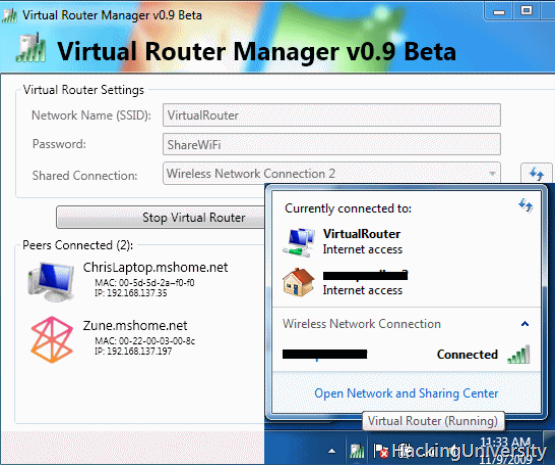
Create Wi-Fi Hotspot,Use Laptop as Wireless Router with Windows 7:


Virtual Router converts any Windows 7 or Windows Server 2008 R2 on a WiFi access point to Windows 7 hosted wireless network (virtual WiFi) technology. Virtual Router router is a free software that works with Windows 7 or Windows Server 2008 R2.
MAKE UR LAPTOP A WIRELESS HOTSPOT FOR USING IT AS A WIRELESS CONNECTION:


Users can wirelessly share any Internet connection (WiFi, LAN, cable modem, dial, cellular, etc) with any Wi-Fi device (laptops, smart phones, iPod Touch, iPhone, Android phone, Zune, netbook, wireless printer, etc.) These devices connect to the virtual router as any other access point and the connection is fully secured with WPA2 (the most secure wireless encryption.)

Create Wi-Fi HotSpot Use Laptop Wireless Router Windows 7
Unlike other similar applications, Virtual Router is not only completely free, but do not bother with any ad. Also, since the Virtual Router is not advertising, does not track your web traffic, the way of other applications with advertising / can.
# Download Virtual Router : LINK
The wireless network or to create shared virtual router uses WPA2 encryption, and no way to disable the encryption. This is actually a feature of the wireless network hosted API built into Windows 7 and Server 2008 R2 to ensure the best possible security.
You can give your "virtual" wireless network in any name you want, and also set the password to anything. Just make sure that the password is at least 8 characters.
You might also like:

Windows XP into MAC OSx Transformation Pack:


FlyakiteOSX is a Transformation pack.It will transform the look of an ordinary WindowsXP+ system to resemble the look of MAC OSX.The installer automates the process of replacing system files,applying registry twekas,installing 3rd part software,skins, and extra such as cursors,sounds,visual styles,etc.

mac-skin

1210660458.871b4ee78127c38ac7ea197457c23127
In case you are not happy with the results of flyakite OSX everything is completely removable.just run the uninstaller from the start menu or Add/Remove Programs.
Flyakite does not contain any spyware or ad-ware of any kind.All files needed for FlyakiteOSX are stored in the Windows directory in the folder named ‘FlyakiteOSX’ that is hidden by default.All registry values for FlyakiteOSX are written to HKEY_LOCAL_MACHINE\Software\FlyakiteOSX.
Download LINK: http://flyakiteosx.en.softonic.com/universaldownloader-launch
Enjoy Do Subscribe to our BLOG for Further Updates and Don’t Forget to Tell Ur Frnds About Us.
You might also like:

Twitter Delicious Facebook Digg Stumbleupon Favorites More